Netgear Wifi Extender Continuously Stops Working
This article provides instructions on how to upgrade your extender's firmware if you are experiencing any issue such as intermittent wireless connection when connected to your extender. This kind of issue can occur if the extender does not have the latest firmware.
Process:
- Make sure the extender is connected to the power adapter provided and into a live power outlet.
- Make sure the extender is within the Wi-Fi range of the wireless router and client device is connected to the extenders network.
- Open the extender GUI using www.mywifiext.net.
- If it's asking for Email and Password, please type the email and password that you have setup for extender account. Otherwise if it's asking for Username and Password, by default Username is admin and Password is password. If the default password is not working you might have already changed the password. So use the password that you have changed to.
- Check if the extender has the latest firmware. If it does not have the latest version, upgrade the firmware to the latest.
- Usually if there is a new firmware available, there will be an alert for new firmware at the top to the extender GUI. Click on the alert to update the firmware.
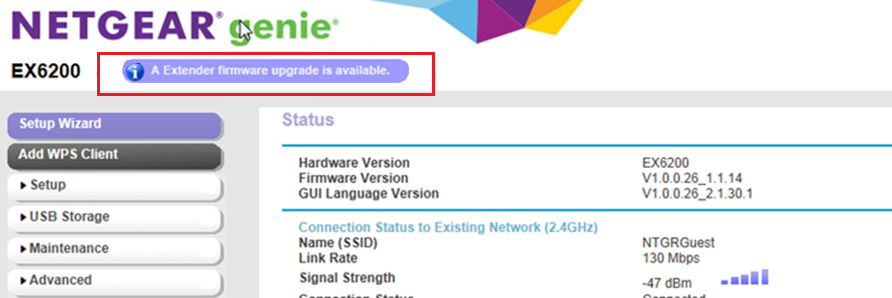
Figure 1: Firmware Update
- Otherwise, click in Device Update page. Click "Check" to confirm if there is a new firmware update or not as shown in Figure 2. If a new firmware is found, proceed to update the firmware.
Note: For NETGEAR extender with the latest NETGEAR genie UI(eg: EX7000), click Firmware Update and then CHECK ONLINE as shown in Figure 3. If a new firmware is found, proceed to update the firmware.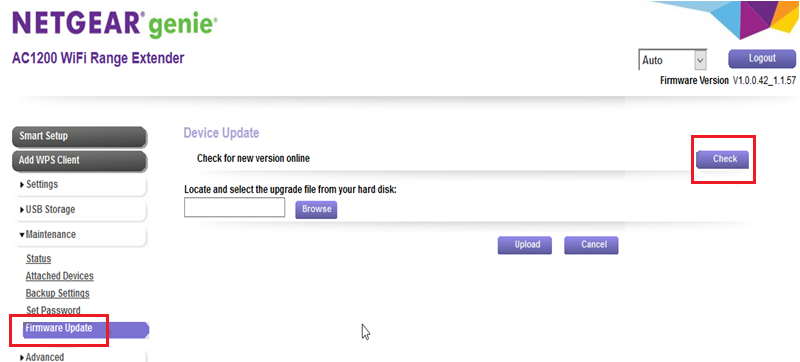
Figure 2: NETGEAR genie Old UI
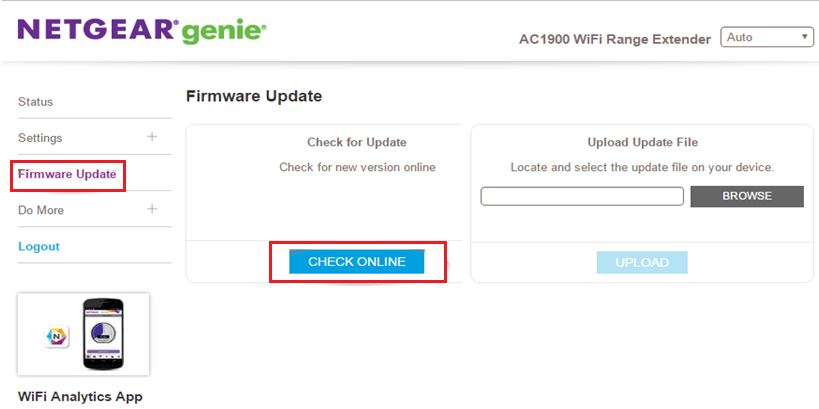
Figure 3: NETGEAR genie New UI
- After the firmware update is complete, reset the extender by inserting a small pin or a paperclip to the reset hole of the extender for about 30 seconds. After resetting the extender, wait for the extender to boot up properly (make sure the power light is either solid green or white).
- Connect a device either through wired or wireless network of the extender.
- Reconfigure the extender again. For installation or reconfiguration of extenders, see Setting up NETGEAR Wi-Fi Range Extenders
Last Updated:07/30/2019 | Article ID: 30349
Source: https://kb.netgear.com/30349/Intermittent-wireless-connection-Range-Extender
0 Response to "Netgear Wifi Extender Continuously Stops Working"
Post a Comment